ChromaCam Is Shutting Down: Meet VCam as an Alternative

ChromaCam has announced that it will shut down on September 30, 2026, bringing an end to a virtual webcam product that has helped individuals and organizations replace, remove, or blur their webcam backgrounds for years.
If you currently use ChromaCam for video meetings, remote work, telehealth, education, content creation, or business applications, you'll need to find an alternative.
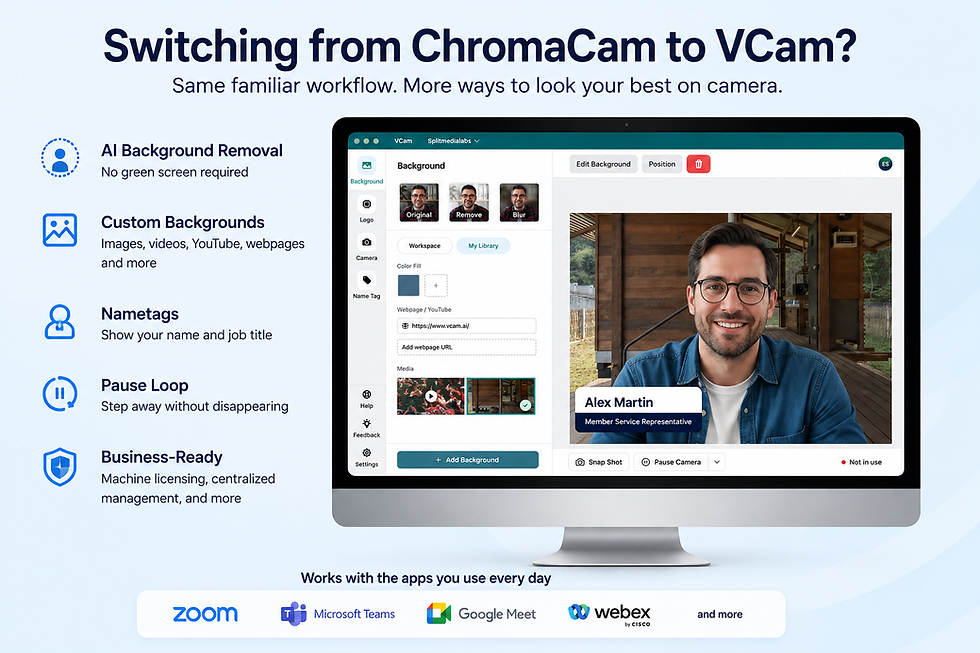
VCam provides real-time AI background removal, replacement, and blur without requiring a green screen. Available for Windows and macOS, VCam works as a virtual camera with the video conferencing, streaming, and communication applications you already use.
What Is Happening to ChromaCam?
Personify has announced that ChromaCam, along with its other applications, will be discontinued on September 30, 2026. According to the company's shutdown announcement, its applications will no longer be supported or maintained after that date.
For ChromaCam users who rely on the software as part of their daily video workflow, now is a good time to start looking for a replacement rather than waiting until support ends.
Looking for a ChromaCam Alternative?
ChromaCam and VCam share one fundamental purpose: allowing you to control what appears behind you on camera without requiring a physical green screen. VCam uses local AI to separate you from your surroundings in real time. You can then remove your background, blur it, or replace it with another image.
This makes VCam useful whether your goal is to protect the privacy of your surroundings, maintain a professional appearance during meetings, create a consistent branded environment, or integrate your webcam into content without showing your actual background.
VCam works as a virtual webcam, so you can select it as your camera in supported video conferencing, communication, streaming, and recording applications.
VCam for Credit Unions
For credit unions, webcam background removal isn't simply about making a video call look better. It can be part of delivering remote member services while protecting the privacy of the employee's physical environment.
VCam can remove the teller or employee's real background and replace it with a neutral or branded environment. This helps prevent members from seeing other employees, office activity, documents, screens, or other visual information behind the person serving them.
VCam is already used by credit unions with ITMs through solutions such as TellerNow and BlueVerse for Hyosung ITMs, helping remote tellers maintain a professional and private video environment when assisting members.
For organizations moving away from ChromaCam, VCam also provides centralized licensing and deployment options designed for use across multiple computers.
VCam for Telehealth
Video consultations can happen from clinics, offices, home offices, and other locations where showing the actual surroundings may be undesirable.
Cam lets healthcare professionals remove or replace their webcam background in real time. This can help keep the physical environment private, remove visual distractions, and provide patients with a more consistent professional setting.
Because VCam processes AI background removal locally on the computer, your video does not need to be sent to the cloud simply to remove your background.
And because no physical green screen is required, the same setup can be used from different working locations.
VCam for Remote Work
Working remotely shouldn't mean having to show everyone where you're working.
A virtual background can hide your home, other people in the room, or anything else you don't want appearing during a meeting. Unlike a basic background blur, complete AI background removal can prevent the real environment from remaining visible behind you.
VCam lets remote workers remove, blur, or replace their webcam background while continuing to use their existing video meeting applications. It's also useful for organizations that want employees to present a more consistent appearance during customer meetings, sales calls, interviews, webinars, and internal meetings.
VCam for Education
Teachers, instructors, tutors, and students increasingly participate in video sessions from locations that weren't designed to be classrooms or studios.
VCam provides a simple way to hide those surroundings without setting up a physical green screen.
Teachers can replace their webcam background with a neutral, branded, or educational background, while students can keep their home environment private during online classes and presentations.
Background removal can also reduce visual distractions, helping keep attention on the person speaking rather than what's happening behind them.
VCam for Content Creators and Streamers
For content creators, removing a webcam background creates more room for the content itself. VCam can act as a virtual green screen, separating you from your background without requiring green fabric, dedicated studio space, or a traditional chroma key setup.
You can place your camera feed over gameplay, demonstrations, presentations, tutorials, or other visual content while using your existing streaming or recording software.
You can also replace your background with a custom image when you want the environment itself to become part of your content.
No Green Screen? No Problem
Traditional green-screen setups work well, but they require physical space, appropriate lighting, and a background that can be consistently chroma-keyed.
AI background removal offers another approach.
VCam identifies you and separates you from your webcam background in real time. There's no physical green screen to install, fold away, light, or carry between locations.
That makes a virtual green screen particularly useful for remote workers, educators, healthcare professionals, and anyone who regularly works from different locations.
It also means that existing ChromaCam users don't need to add new hardware to continue using background removal after ChromaCam shuts down.
Frequently Asked Questions
When is ChromaCam shutting down?
Personify has announced that ChromaCam will be discontinued on September 30, 2026. The company states that its applications will no longer be supported or maintained after that date.
What is a good alternative to ChromaCam?
If you primarily use ChromaCam for webcam background removal, replacement, or blur, VCam offers these core capabilities on both Windows and macOS. It works as a virtual camera with supported video conferencing, communication, streaming, and recording applications.
Can VCam remove my webcam background?
Yes. VCam uses local AI to identify you and remove your webcam background in real time. You can leave the background removed, blur it, or replace it with another background.
Can I replace my webcam background without a green screen?
Yes. VCam provides AI-powered background removal without requiring a physical green screen. This creates a virtual green-screen effect using a regular webcam.
Does VCam work on Windows and Mac?
Yes. VCam is available for both Windows and macOS.
Does VCam process background removal in the cloud?
No. VCam's AI background removal runs locally on your computer. This is particularly useful when keeping video processing on the device is important for your organization.
Ready to Move From ChromaCam?
ChromaCam may be shutting down, but you don't need to give up the webcam background features that have become part of your daily workflow.
VCam gives individuals and organizations an AI-powered way to remove, blur, or replace webcam backgrounds without a green screen, whether you're meeting with customers, treating patients remotely, working from home, teaching online, or creating content.
Using ChromaCam across your organization? Contact the VCam team to discuss licensing, deployment, and your migration to VCam.


Comments